Choosing a Keynote Template: Evaluating the Mulesa Presentation System
When preparing a presentation, the choice of template often serves as the foundation for your entire project. It can dictate the visual tone, influence the pacing of your information delivery, and significantly impact the time required for production. Among the many options available, the Mulesa - Keynote Template represents a specific approach, designed as a comprehensive, multipurpose toolkit. Understanding its structure, capabilities, and ideal application scenarios can help you determine if it aligns with your particular needs or if a different style of template might be more appropriate.
What Is the Mulesa Keynote Template?
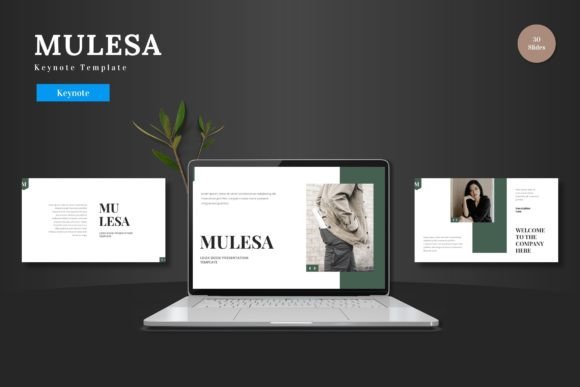
The Mulesa - Keynote Template is not a single slide design but a bundled system of presentation assets. It is defined by its volume and internal organization: 150 total slides distributed across five distinct color schemes, resulting in 30 slides per color variation. This structure means you select a primary color palette—blue, red, green, etc.—and then have a complete set of slides within that theme. The core promise is a clean, scalable, and multipurpose design suitable for various contexts, from business pitch decks to product promotions and e-commerce presentations.
A distinguishing characteristic is its commitment to editing within Apple's Keynote application. All elements, from shapes to infographics, are built using Keynote's native tools. This means you can adjust colors, resize illustrations, input text, and replace images via placeholder boxes without needing auxiliary software like Adobe Illustrator. The template includes animated slides and is intended for the "drag and drop" workflow, aiming to reduce technical friction for users proficient in Keynote.
Key Features and Practical Implications
Evaluating a template requires looking beyond the feature list to understand how those features translate into real-world use. The Mulesa - Keynote Template offers several notable components.
Volume and Color System
With 150 slides, the template provides extensive options. For a user, this means a high likelihood of finding a slide layout that fits a specific message—whether it’s a complex data chart, a team profile, or a portfolio gallery. The five pre-made color variations offer a quick way to align the presentation with brand colors or thematic needs without manually recoloring every element. However, this volume requires navigation; you'll spend time browsing the slide library to find the right layout rather than building from a smaller set of core slides.
Native Keynote Editing
This is a significant factor for workflow compatibility. If your standard tool is Keynote and you prefer to stay within that environment, Mulesa's design philosophy removes the need for external graphic editing. "Pixel-perfect illustrations" and "resizable graphics" that maintain quality are key benefits here. The tradeoff is that these elements, while editable, are constrained by Keynote’s own vector editing capabilities. For users who require extremely specialized, non-standard graphic manipulation, this might present a limitation, though for most business purposes, it is sufficient.
Structure and Specialized Slides
The inclusion of section break slides, handcrafted infographics, and dedicated portfolio slides suggests a template built for structured storytelling. It supports presentations that need clear segmentation (like different product phases) and visual data representation. The animated slides add a dynamic element, but their usefulness depends on your presentation style; some audiences prefer minimal animation, while others engage more with subtle motion.
Comparing Template Philosophies: Where Mulesa Fits
Presentation templates generally fall into a few categories: minimalistic single-theme packs, highly niche-specific designs (like a template solely for financial reports), and expansive multipurpose systems like Mulesa - Keynote Template. Its main comparative advantage is breadth and internal consistency. Once you choose a color scheme, you have a uniform design language across 30 different slide types.
An alternative approach is a template with fewer slides but more radical, distinctive artistry—perhaps a template with bold, unconventional layouts. Mulesa leans towards professional, clean aesthetics, which is versatile but may not stand out in a field where visual uniqueness is paramount. Another common alternative is a subscription-based service offering ongoing template updates. Mulesa is a one-time purchase, a static but extensive library. Your decision here hinges on whether you need a reliable, reusable toolkit for multiple projects over time, or if you prefer frequently refreshed, trend-conscious designs.
Strengths of the Mulesa Approach
- Cohesion: The master slide basis and color schemes ensure visual harmony throughout a long presentation.
- Efficiency for Keynote Users: The all-in-Keynote editing streamlines the process for those who want to avoid software switching.
- Range of Layouts: The high slide count covers many common business and promotional scenarios, reducing the need to create custom slides from scratch.
- Scalability: The clean design and resizable elements allow it to adapt from internal meetings to large conference screens.
Potential Tradeoffs and Limitations
- Learning the System: Navigating 150 slides requires initial familiarity to use efficiently.
- Style Flexibility: While colors are editable, the overall "clean" aesthetic is fixed. It may not suit projects needing a grungy, vintage, or intensely playful vibe.
- Niche Depth: For hyper-specialized presentations (e.g., advanced scientific research), you might still need to create custom slides beyond the provided infographics.
- Software Lock-in: It is fundamentally a Keynote template. While you can export to other formats, the seamless editing experience is lost if you try to modify it in PowerPoint or Google Slides.
Decision Factors: When Is This Template the Right Choice?
Choosing the Mulesa - Keynote Template is likely a strong fit under specific circumstances. Consider it if your primary presentation software is Apple Keynote and you intend to stay within it. It is highly suitable for professionals, entrepreneurs, or marketers who need to produce a variety of business presentations (pitch decks, product launches, quarterly reviews) and value having a consistent, reusable visual asset library. The multipurpose claim holds true if your needs span general business, e-commerce, and promotion.
It is also a practical choice when time for design work is limited but the requirement for professional polish is high. The placeholder images and drag-drop galleries can accelerate production. Furthermore, if you or your organization has a defined color palette, starting with one of the five color variations can shortcut the alignment process.
When to Consider Other Options
You might need to explore alternatives if your work demands presentation in software other than Keynote. While conversion is possible, the editing benefits are lost. Similarly, if your projects consistently require a very specific, non-corporate aesthetic (like artistic portfolios or avant-garde brand presentations), the clean and scalable nature of Mulesa might be too generic. Also, if you prefer building presentations from a very small set of ultra-flexible blank slides, the large pre-built library could feel restrictive rather than liberating.
Finally, assess the volume. Do you regularly create 20+ slide presentations? If you typically make shorter, 5-10 slide decks, a template with 150 slides might offer more than you need, and a more condensed template could be simpler to manage.
Making an Informed Selection
Ultimately, selecting a presentation template is about matching a tool's philosophy with your workflow, style needs, and project frequency. The Mulesa - Keynote Template presents a compelling package for the Keynote-centric user seeking a one-time, comprehensive solution. Its strengths in cohesion, native editing, and layout variety address common pain points in business presentation creation. By understanding its structure—the 5-color system, the 30-slides-per-color organization, and the Keynote-specific features—you can better gauge if it will integrate smoothly into your process.
Evaluating it requires a honest assessment of your own priorities: Is software consistency important? Do you value a wide selection of pre-designed slides over a smaller, more unique set? Is a clean, professional aesthetic suitable for your audience? By weighing these factors against the template's outlined capabilities and tradeoffs, you can move beyond a simple feature list and make a decision that genuinely enhances your presentation workflow.