Oculox PowerPoint Template: Designed for Clarity and Confidence
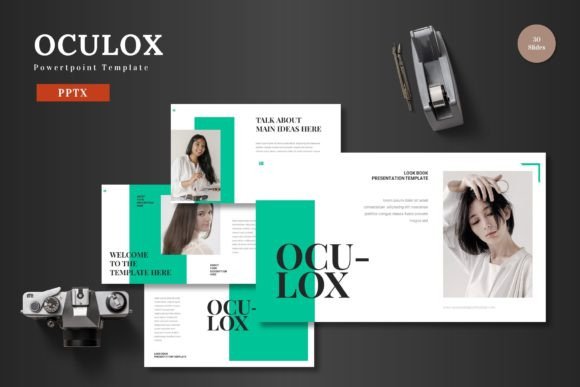
The presentation is often the final frontier between an idea and its acceptance. Whether pitching to investors, educating a team, or sharing a creative vision, the moment you share your screen is decisive. Yet, the process of creating that presentation can be a significant hurdle—a drain on time and creative energy that pulls focus from the core message itself. This is where a professional template like Oculox PowerPoint Template shifts the paradigm. It is not merely a collection of slides; it is a structured design system engineered to let you share your ideas with confidence by providing a foundation of visually stunning slides that seamlessly combine data, graphics, and impactful content.
The Modern Demand for Visual Communication
The landscape of professional and creative communication has evolved dramatically. User expectations have risen, influenced by the polished visual language of digital media and technology. Audiences, from busy executives to online learners, now instinctively judge the credibility and value of content by its presentation. A disjointed, text-heavy slide deck can undermine even the most robust data, while a cohesive, visually engaging presentation amplifies authority and aids comprehension. This trend reflects a broader shift towards visual efficiency—the need to convey complex information quickly and memorably within the constraints of modern workflows.
Oculox PowerPoint Template is designed for this exact environment. It recognizes that professionals, entrepreneurs, educators, and creators are not graphic designers by trade, yet they require designer-level output. The template’s customizable layouts and easy-to-use features bridge this gap, allowing you to focus on curating your message rather than wrestling with alignment, color schemes, and graphic creation. It fits into the reality of iterative work: a project update needs a fresh deck by tomorrow, a marketing strategy requires visualization by the afternoon. Oculox provides the toolkit to meet these demands without sacrificing quality.
Core Structure: The Framework for Effortless Creation
At its heart, Oculox offers a systematic approach. The package includes 150 total slides, thoughtfully distributed across 5 premade colors with 30 slides for each template. This structure is pivotal. It means you aren't starting from a single blank slate but from a curated library of slide types—title slides, section breaks, infographics, portfolios, data charts—all already harmonized within a specific color theme. You choose the color scheme that matches your brand mood or presentation tone, and instantly have 30 coherent slides to work with.
The inclusion of dedicated Section Break Slides speaks to an understanding of narrative flow. A good presentation guides its audience through chapters, and these slides provide clear, visual punctuation, helping you structure your story and maintain audience engagement through logical transitions.
The Power of Master Slides and Customizable Graphics
A cornerstone of the template's efficiency is its foundation on Master Slides. This means global design elements—fonts, color placements, logo positions—are controlled from a central point, ensuring consistency across every slide you add or modify. When you change a detail on the master, it updates throughout, protecting your deck from the common scourge of inconsistent formatting.
Further empowering the user are the handcrafted infographics and pixel-perfect illustrations. These are not static images but dynamic, editable elements. Every graphic is resizable and editable directly within PowerPoint. You can change colors to fit your scheme, adjust sizes to balance your layout, or modify components to better represent your specific data. This level of flexibility transforms pre-made assets into personal tools.
For real-world content, the Picture Placeholder system and the dedicated Gallery and Portfolio slide are essential. The drag-and-drop functionality allows you to insert photographs, screenshots, or product images seamlessly into perfectly framed areas, maintaining the slide's design integrity. Whether showcasing team members, project outcomes, or product features, these features ensure your visual evidence integrates flawlessly.
Practical Implications for Diverse Users
The utility of Oculox spans the wide audience it serves. For the entrepreneur or business owner, time is the scarcest resource. Using this template, they can rapidly assemble a investor pitch or business plan presentation that looks professionally crafted, allowing them to concentrate on refining their financial models and value proposition. The 5 color variations offer quick adaptation for different contexts—a bold scheme for a product launch, a more conservative one for a financial review.
Marketers and bloggers often need to present campaign results, content strategies, or audience analytics. The infographic slides and data visualization layouts enable them to turn metrics and trends into compelling stories, making reports more persuasive and shareable internally or with clients.
Educators and freelancers operate in spheres where clarity and engagement directly impact success. An educator can transform a complex lesson into a clear, visually aided lecture, while a freelance designer or consultant can use the portfolio and gallery slides to present their work in a context that itself demonstrates good design sense, enhancing their credibility.
Even for hobbyists or curious readers tackling a community project or personal venture, the template demystifies the process of creating a "proper" presentation. The included Readme file and clear documentation on fonts and photo information provide guidance, making the tool accessible regardless of prior PowerPoint expertise.
Beyond Features: Enabling Confidence and Resonance
The stated goal of Oculox PowerPoint Template is to let you "effortlessly create presentations that resonate." This resonance is the true metric of success. A resonant presentation connects logically and emotionally; it is understood and remembered. The template facilitates this by removing aesthetic friction. When slides are inherently balanced, graphics are sharp and relevant, and the flow is structurally sound, the presenter's energy can focus entirely on delivery and connection with the audience.
This confidence is not a small thing. Presenting from a deck that you know looks professional alleviates a layer of anxiety. It allows you to stand in front of a room or a screen and own your ideas, because the medium supporting those ideas is robust and reliable. You are sharing your ideas with confidence because the template has handled the foundational design work, guaranteeing a baseline of visual quality that supports, rather than distracts from, your core message.
Integration into Modern Workflow
The main files included—5 PPTX files (one for each color scheme) and the organized folder structure—are built for practical use. You open the PPTX file that matches your chosen color, and you begin working immediately from a set of 30 ready-made slides. This is a workflow-centric design. It avoids the confusion of managing hundreds of individual slide files and streamlines the process from selection to creation. The 5 color schemes contained within are not arbitrary; they are likely curated to cover a range of professional scenarios: corporate, creative, modern, bold, and classic.
In an era where tools are judged by their integration into fast-paced, often collaborative environments, this straightforward, file-based approach is a significant advantage. It means the template can be used by an individual or easily shared with a team member for collaborative editing, with everyone working from the same stable design foundation.
A Tool Aligned with Contemporary Needs
Oculox PowerPoint Template represents a response to a clear and growing need: the democratization of high-quality visual design for communication purposes. It does not promise to automate the creative thinking behind a presentation—that remains the user's crucial domain. Instead, it automates and systematizes the execution of that thinking into a visual format. By providing a rich library of editable, cohesive components, it empowers users across fields to produce work that meets contemporary standards of visual communication.
The evolution here is away from the "build everything from scratch" model, which is inefficient for non-designers, and towards a "customize from a sophisticated foundation" model. This reflects market preferences for tools that are both powerful and practical. For anyone who needs to convey ideas with impact—from the professional delivering a quarterly review to the creator launching a new online course—Oculox serves as a practical ally. It turns the often-daunting task of slide design into a structured, efficient process, ensuring that the final presentation not only carries your ideas but also visually amplifies them, allowing you to present with clarity and confidence.